

Findpet - smart pet registry
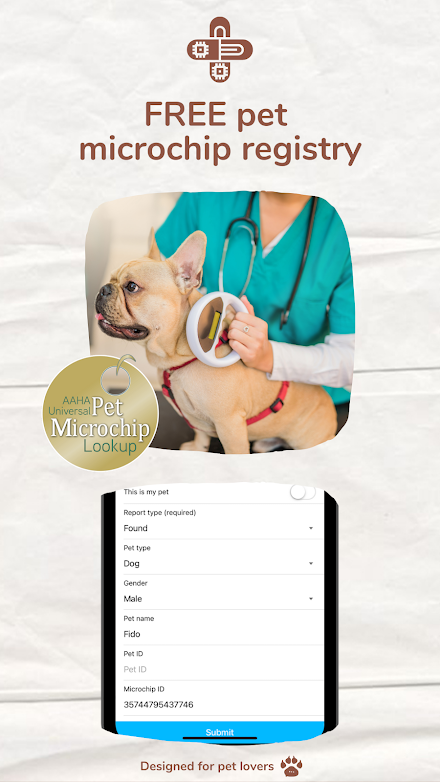
Findpet offers a FREE microchip pet registry (24/7 AAHA’s Universal Lookup Tool searchable) and additionally protects your pet with advanced biometric tools like nose print identification, full-body pet recognition, including face, front, sides, top, back, and pet’s unique identifying markings, fur and color patterns.Protect your pet by registering it with Findpet.
With advanced biometric identification tools, Findpet protects your pet in case of loss or theft and automates lost pet search to return your furbabies back home fast and safely.Findpet complements pet microchip technology.
No need to use a pet microchip scanner or other additional equipment - now all you need is just your smartphone!You no longer need to view dozens of lost pet posts every day.
Findpet biometric pet identification technology automates the lost pet search and shows you only relevant pets and automatically notifies you if there is a similar pet in your local shelter.NOSE PRINT IDENTIFICATIONDogs are protected by our advanced nose print identification technology- nose prints are universal dog identifiers like fingerprints for humans- exceptional accuracy >98,5%- just upload 2-3 5 second videos of the dogs nose with a clearly visible patternFULL-BODY PET RECOGNITIONPets are protected by Findpet’s advanced full-body pet recognition technology- universal pet identification profile based on uploaded photos- high accuracy >90%- just upload a set of photos of your pet, incl.
face, front, sides, top, back, and bottomUNIQUE IDENTIFYING MARKINGS, FUR, AND COLOR PATTERNSPet’s unique markings, fur, and color patterns are used to identify and search for lost pets- moderate accuracy >80%- upload photos of your pets unique markings, fur, and color patternsMICROCHIP PROTECTIONTo protect your pet with a microchip:1) Microchip your pet with any brand chip2) Register your pet’s microchip for FREE (for life) at Findpet3) Findpet registry is fully searchable 24/7 by AAHA’s Universal Lookup Tool4) Report your pet lost in case your pet goes missingIf you’ve found a lost pet:1) Visit your local vet or shelter to scan the pet for the microchip ID2) Check the Microchip ID at Findpet.com and at the AAHA’s Universal Lookup Tool3) If the pet is registered, contact the owner to arrange a reunionHOW TO PROTECT YOUR PET?1) Microchip your pet and add it to your pet’s Findpet profile 2) Follow the app’s instructions and take photos of your pet to protect them using Findpet biometric identification tools3) If you have a dog, take up to three 5 second videos of the dog’s nose print with a clear pattern.
In a few hours, you will receive a notification if the uploaded videos can be used for identification or you’d be asked to upload new ones.LOST YOUR PET?1) Follow the form instructions.
Upload as many high-quality photos of your lost pet as possible.2) Add your pet’s microchip, if known.3) Generate the lost pet flyer and place them around your neighborhood.4) Periodically run the search by photo tool using various photos of your pet.5) Subscribe for Findpet Premium automated alerts about similar pets in your area.FOUND A MISSING PET?1) Follow the app’s instructions and take photos of your pet to protect them using Findpet biometric identification tools.2) If you’ve found a dog, try to film up to three 5 second videos of the dog’s nose print with a clear pattern.
In a few hours, you will receive a notification if the uploaded videos can be used for identification or you’d be asked to upload new ones.3) Visit your local vet or shelter to read the pet’s microchip and add it to the report.4) Generate the found pet flyer and place them around the area you’ve found the pet.CONTACT USIf you have an idea, would like to report a bug, or looking to partner with Findpet, please email us at [email protected]
About Findpet - smart pet registry
- Package name (App ID)
- com.findpet.app
- Available on
- Google Play
- Price
- Free
- Developer
- Findpet PBC, a Public Benefit Corporation
Looking for the Findpet - smart pet registry APK?
The safest way to get Findpet - smart pet registry (com.findpet.app) on your Android device is to install it directly from Google Play — you'll always get the latest official version, automatic updates, and no risk of modified or infected APK files from third-party sites.

Camera Features
Advanced camera features with editing capabilities.
Lifestyle
Enhance your lifestyle with personalized tips and features.
Parenting Tools
Track and manage your child's development and daily activities.
See Findpet - smart pet registry in Action


Frequently Asked Questions
Is Findpet - smart pet registry free?
Yes, Findpet - smart pet registry is free to download and install on Android through Google Play.
How do I install Findpet - smart pet registry on Android?
Open Google Play on your Android phone or tablet, search for Findpet - smart pet registry by Findpet PBC, a Public Benefit Corporation or tap the Google Play button on this page, then tap Install. The app downloads and installs automatically.
What is com.findpet.app?
com.findpet.app is the App ID (package name) of Findpet - smart pet registry on Google Play. Every Android app has a unique package name, and it is the safest way to verify you are installing the official app.
Is Findpet - smart pet registry safe to download?
Installing Findpet - smart pet registry from Google Play is the safest option: you get the official version published by Findpet PBC, a Public Benefit Corporation, verified by Google Play Protect, with automatic updates. Avoid APK files from unofficial third-party sites.

Get Findpet - smart pet registry Today
Findpet - smart pet registry for Android — free download on Google Play.
Compatible with Android phones and tablets — available on Google Play.
Ask AI about this app
Get instant answers about features, tips and more from popular AI assistants.